



Use this link to sign up to an account on the Deribit exchange with discounted trading fees:
http://nitrocrypto.com/deribit_signup
Enter the basic details required to create an account, including confirmation via link sent to email, and login.
Next, you will access your Deribit account to create an API key for trading. This is how N2O Crypto Bot connects to your account to do the trading (buy/sell).
Select the Account menu option. You can create sub-accounts if you wish, and select the same Account menu for whichever sub-account you want to use for trading.
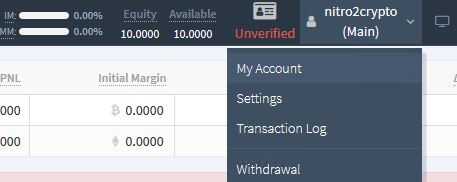
Now, select the Api menu and click ‘Add a new key’:

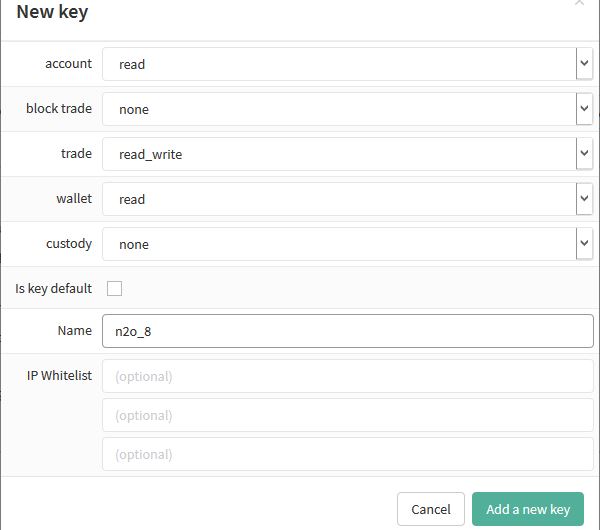
Select permissions to the API as shown below — note if you give read/write access to your wallet, the API can be used to also withdraw from your wallet. Give a name to your API client. It’s best to stay within 8 characters so you can use the same client name as is when setting up in N2O Crypto Bot.
You should be able to see the new API key added in list. Note the Client Id and Secret: copy them one by one using the option provided alongside each.

Put the Client Id and Secret together in this format – separated by a comma:
meoXveu1, v2D3oqV0lRW9h9FVwBlr1qP2DB6YKketGZZroBPypXE
You can now use this when prompted in N2O Crypto Bot to supply API key Client Id and Client Secret.
Like!! I blog quite often and I genuinely thank you for your information. The article has truly peaked my interest.
Thanks.. N2O Bot will be launched soon! stay tuned and check back here in a few days for more updates.
We’ll also be having a newsletter sign up.